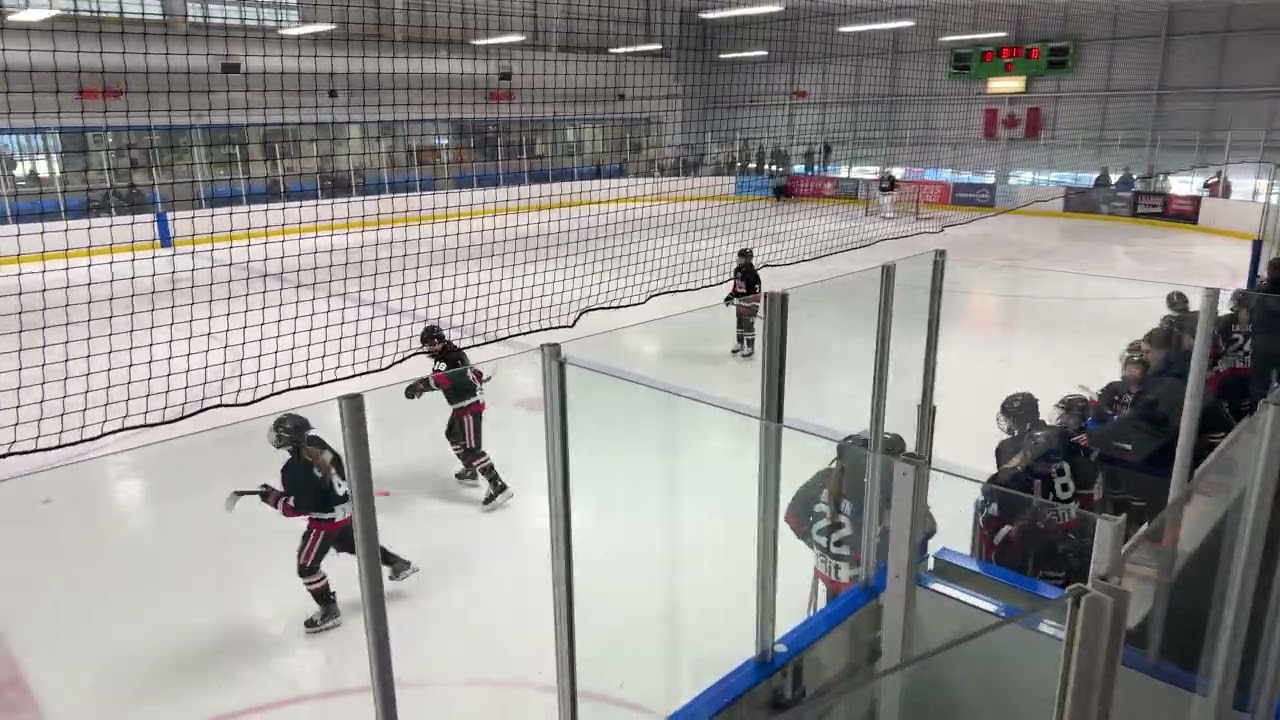
Filmed using Insta360 Flow 2 PRO + iPhone 16 Pro Max
Hockey Pro
1x zoom
Virtual sideline set to 2m
Height set to 3.5m
Not sure if it’s the Virtual sideline or something else, today the camera pulled away from the faceoff a few times to aim at the centre of the rink where only a ref was not moving and just standing at the boards. I also noticed that it seemed to have a limit and not pan too far left but it would continue to pan too far to the right.
Looking at it some more, I’m pretty sure it was the virtual sideline set too large. I might just keep it turned off. When the play goes into the left corner, it wants to ignore it and go back to center. Strange that it’s not the same on the right side…
Haha another rink with inconvenient black netting …
Looks like you are centered properly but today same thing I noticed on mine that one sideline was way off and not parallel with the sideline when it went too far to the left - it went very off angled.
So I had to do a reset and turned the sideline function off/on next time when looking straight ahead and then it reset and fixed itself with lines down both sides just above and parallel the actual side boards.
It looks like the virtual sideline can lose or change its calibration if turned on when not centered? Even just being slightly off will skew it alot at the far ends.
It takes a minute or two to figure out but for every ice rink setup just need to find the right combination of tilt angle/sideline/height settings.
One feature that would be great to have is an on screen button that keeps the camera still in the default center start position and not scanning while adjusting settings at the beginning to get the playing surface centered.
I think you are right about that. Because I have to start the recording when the unit is within reach, I cant see the virtual sideline when the Insta360 is in place. It’s usually 12-14 feet in the air so resetting it means bringing it back down. So I think it will just disable it for now.
I’ve used Pix4team robot before and it’s UI requires another device like an iPad ideally and you set the rink limits before recording and it will not go beyond. It also suffers from the quick left right panning issues. I wonder if the logic can be that instead of going full 180 the other way, we can just slow down the direction we are going in. A more dampened effect. Even manually, I have to go very fast to catch up to the play but I’m also trying to make it a smooth as possible when I have to change directions and avoid stop and go stuttering if I’m panning.
Not sure the AI can be programmed or even if the gimbal has the physical or software capability to smooth out the movements.
Considering we are both using the same newer gimbal they definitely are capable of smoother fluid panning left to right.
Hopefully it is just a matter of fine tuning and tweaking the tracking AI logic so it can figure out where the puck is even when it can’t see it which is relatively unique among all the major sports.
The only thing at the moment that I think would help is if the gimbal itself on the tripod could also rotate slowly along the x axis and move with the play left and right.
I feel the same way about smoothing capability. The gimbal must be able to have the capability fo smoothing out. I think there are some settings you can access in the Insta360 app but I have not touched anything.
I feel that a hockey profile at least from a youth hockey local rink perspective can be broken down fairly simply into 4 categories
End zones
Neutral zone
Hockey related nuances
Misc
End zones
make sure the goalie is in view as quickly as possible when entering an endzone
limit panning from bottom edge of the arena diagonally to the top blue line
there should be very little movement in this zone
Neutral zone
This is where quicker movement may be necessary but dampen 180 degree changes and accelerate as players enter the zone to bring the goalie into the screen quickly
Hockey related nuances
players changing on the fly, keep focus on the live play, do no focus on players rushing to get off the ice
faceoffs puck is not in play and players are slowly gathering (limit jerky searching for the play)
puck out of play, icing of the puck, puck is in the refs hand, etc
when to focus on the refs and when NOT to focus on the refs
Misc
don’t pan beyond the edge of the rink
maximize the ice surface in the frame and tilt to accomodate the left and right panning (tilt downward in the center to get the ice / boards close up and tilt up in the endzones to keep the ice filling up the screen)
These are all great things that can hopefully be programmed to give it better “hockey sense” and will be likely unique for hockey mode tracking.
Assuming these tracking/panning issues will all be addressed over time, I am also compiling a wish list of things that I think would improve the user experience and have also been mentioned by others.
125% Zoom 60fps
Internal GoPro like image stabilization processing > Smoother panning
Virtual sideline left/right offset > corner viewpoint or x/y range limits
Default file name prefix %date% %time%
Battery % Status and Battery Life Management
Scoreboard Bar Bottom Overlay
Practice/Scouting View Mode
Saved setting presets (for repeat fixed same locations)
I guess the goal is to always keep it as light and simple to use as possible - while recording the action perfectly. Getting there!