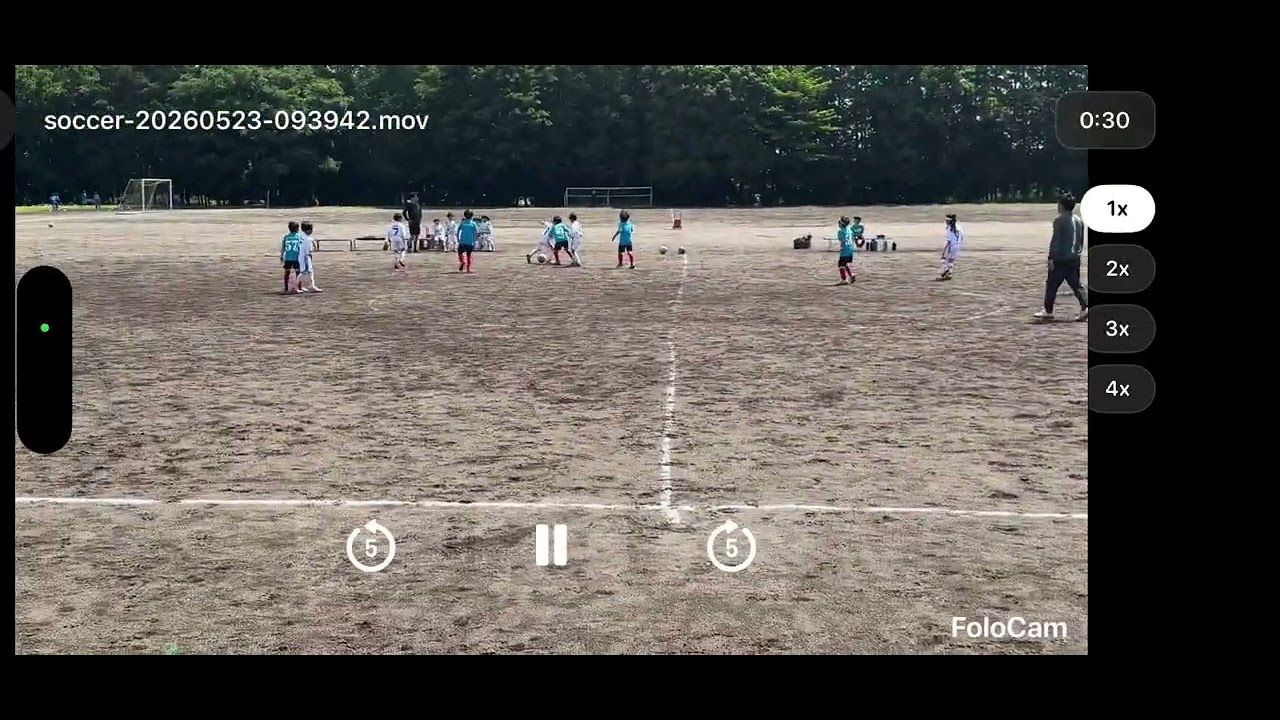
Hi, I need some help setting up FoloCam with Insta360 Flow 2 Pro for a kids soccer game.
I’m trying to record an elementary school 5v5 soccer match using:
-
iPhone 15 Pro running iOS 26.2.1
-
Insta360 Flow 2 Pro, firmware v5.75.47
-
FoloCam, apparently the latest version because no App Store update is available
-
Soccer / Soccer Pro mode
-
Apple DockKit connection
The iPhone seems to be connected correctly. In Bluetooth settings, both “Flow 2 Pro” and “Flow 2 Pro Dock” are connected. In FoloCam, I can see the P/Y angle values, and the green status indicator appears, so I think the gimbal connection itself is working.
The Insta360 app says the Flow 2 Pro firmware is up to date.
My setup:
-
5v5 elementary school soccer match
-
Young kids, around U8/U9 level
-
Dirt/gravel field
-
Camera height: around 6.5 ft
-
Camera position: around 10 ft away from the sideline/touchline
-
Starting position is shown in the attached screenshots
-
I tried both Soccer and Soccer Pro
-
I tried different zoom levels: x1, x2, and x3
-
The ball was sometimes quite close and clearly visible near the center area of the screen
The problem:
Even when the ball is clearly visible, FoloCam does not seem to track the soccer ball at all.
Also, after double-clicking the button on the Flow 2 Pro to return to the initial position, when I single-click to start tracking, the gimbal sometimes tilts up toward the sky, sometimes tilts down toward the ground, and occasionally points in a reasonable direction, but still does not track the ball.
I’m not sure if this is a setup/orientation problem, a gimbal/DockKit issue, a software compatibility issue, or if I am misunderstanding how to start tracking.
I’m also wondering if the following conditions could be causing the issue:
-
The players are very young, so the ball movement is less predictable and there are many players around the ball
-
There are multiple soccer balls visible in the frame, especially near the sideline and benches
-
Another soccer game/practice is happening in the background
-
The field is a dirt/gravel field, so the ball may not stand out clearly enough
-
The camera may be too close to the sideline or not high enough
I was really looking forward to using FoloCam for my son’s games, so I’d really appreciate practical advice on how to make it work properly. I don’t need it to be perfect, but I would like to understand the correct setup and what conditions are required for stable ball tracking.
Could you please advise on the correct setup?
Specific questions:
-
Is the iPhone orientation correct for Flow 2 Pro + FoloCam? Should the bottom/charging port side of the iPhone face right in landscape mode?
-
Should the camera be aimed at the center of the field when Y = 0°?
-
Is 6.5 ft camera height enough for 5v5 kids soccer, or should it be higher?
-
Is being around 10 ft away from the touchline too close or too far for FoloCam?
-
Could multiple balls in the frame prevent FoloCam from locking onto the match ball?
-
Could another game/practice in the background interfere with ball detection?
-
Does FoloCam work well for younger kids’ soccer, such as U8/U9, where the play can be crowded and less structured?
-
Is there any specific setting required in Soccer Pro mode to make the ball tracking start?
-
Is there any visual indicator that confirms the ball has been detected or locked?
-
For iPhone 15 Pro, should I use x1, x2, or x3 zoom for this kind of small-sided kids soccer match?
-
Is there anything wrong with my starting position shown in the screenshots?
-
Are iOS 26.2.1 and Flow 2 Pro firmware v5.75.47 known to work properly with FoloCam soccer tracking, or could this be a compatibility issue?
I have attached screenshots of the camera view, Bluetooth connection, firmware version, and setup. Any advice would be appreciated.
If helpful, I can also upload a short screen recording showing the gimbal tilting toward the sky/ground and not tracking the ball.